
github.com
aasixh/devgrep
Terminal-native search for shell history, logs, and markdown notes. Go + Bubble Tea TUI, MIT, v1.0.0. go install github.com/aasixh/devgrep@latest
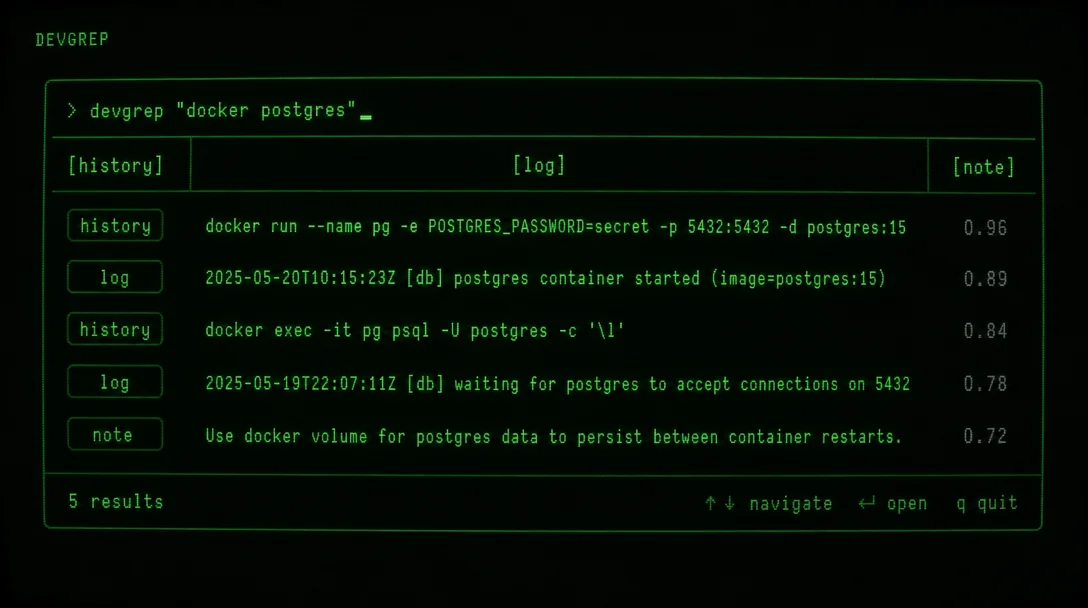
devgrep is a one-day-old Go + Bubble Tea TUI (MIT, v1.0.0, 26★) that indexes shell history, .log files, and markdown notes into a local SQLite database and exposes all three through a single fuzzy-search interface — framed honestly as an early radar find with zero community signal and a broken curl installer.

iptables command is somewhere in your shell history — buried under 2,000 newer entries, behind a zsh session boundary, or gone after a history rotation. Your runbook lives in a markdown file you haven't opened since. The relevant log line is in a .log you'd have to grep six directories deep.Ctrl+R doesn't span log files. rg doesn't rank results by when you last used them. You end up grep-ing memory instead of files..log files, and markdown notes into a single local SQLite database, then expose all three through one fuzzy-search TUI 1. As the README puts it 2:"devgrep is a terminal-native search engine for developer workflows."
go install github.com/aasixh/devgrep@latestcurl | sh release script is broken — it expects .tar.gz archives but the release assets are bare binaries 5 3. The make build path works if you clone the repo. Neither Homebrew nor any package manager is available yet.go.mod declares Go 1.24.5 6 4. If go install fails, check your Go version first.kubectl command to rotate a service account token, but you can't remember the exact flags. You also have a notes file from that debugging session.# Build your index first
devgrep index
# Search across everything
devgrep search "kubectl service account"[history], [note], and [log] in ranked order — fuzzy-matched and scored by recency, frequency, and how close the working directory was to your current project. You can also hit it from a script without the TUI:devgrep --plain search "kube auth failed" --source history,logsdevgrep index ~/projects/api # index + start watching
devgrep index ~/projects/api --no-watch # index once, no watcherfsnotify with a 500 ms debounce; deleted files are removed from the index automatically 7.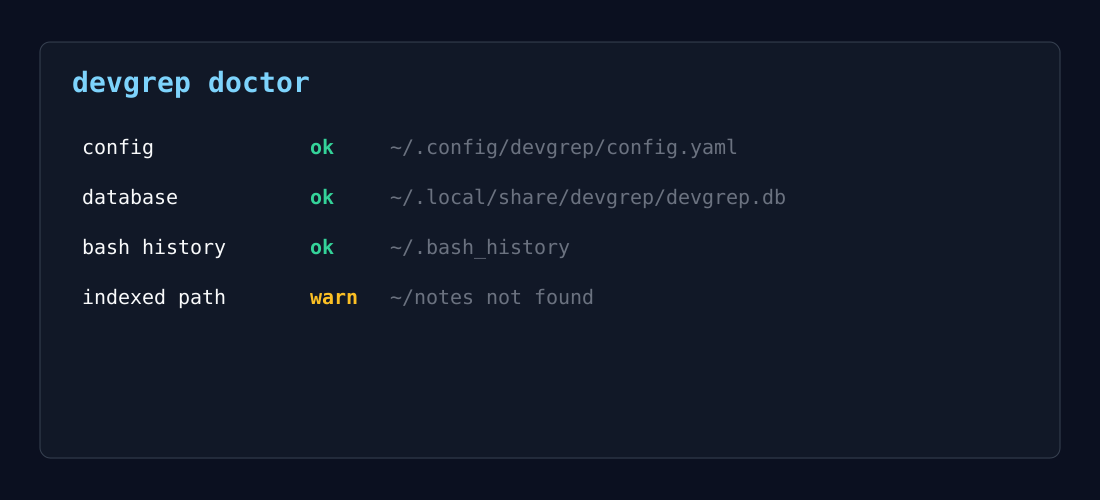
doctor output — health check view inside the Bubble Tea TUI 2| Tool | What it searches | Multi-source index |
|---|---|---|
Ctrl+R / fzf | Shell history only | No |
| atuin (20k+ ★) | Shell history, optional sync | No |
| mcfly | Shell history, neural ranking | No |
| hstr | Shell history | No |
| ripgrep (rg) | File contents (logs, notes, etc.) | No unified index |
| devgrep | Shell history + logs + notes | Yes |
"Please keep changes offline-first, terminal-first, and dependency-conscious."
go install is worth running to see whether the TUI works as described. The install script is not. Check your Go version before you try, star the repo if the concept interests you, and revisit in a few weeks to see whether the install.sh gets fixed, the release description gets corrected, and any community usage surfaces. A tool this new earns its spot on the radar by surviving the next month, not by having the features today.Terminal-native search for shell history, logs, and markdown notes. Go + Bubble Tea TUI, MIT, v1.0.0. go install github.com/aasixh/devgrep@latest
Documentation site: installation, configuration, architecture, and command reference for devgrep v1.0.0.
このコンテンツについて、さらに観点や背景を補足しましょう。